
Do you want to extract Outlook items from PST file and save them as MSG? But can’t find the right way to perform this operation? If yes, then don’t worry as this article has the solution. Here we will explain the easy and safe ways to export Outlook items and convert PST to MSG. Let’s start reading.
Microsoft Outlook is one of the most famous applications that a large number of users around the world uses to manage their email accounts. Apart from this, it supports managing many other information such as contacts, calendar, tasks, and more.
All that data of the user profile Outlook supports storing locally inside different file types. The two main formats of Outlook that it uses to store data are: PST (Personal Storage Table) and MSG (Message).
While PST files store multiple Outlook items such as emails, contacts, and calendars, MSG files on the other hand store individual items (usually email messages). MSG helps users save their each item in a single file to organize and store them efficiently.
Also Read: – How to Convert OST to MSG Outlook files? A Step-by-Step Guide
Outlook PST and MSG File Formats – An Overview
PST – Outlook PST (Personal Storage Table) file format stores an entire mailbox with all of its items—emails, contacts, calendar items, tasks, and more. It is the default format that Outlook uses to store profile data. Also, Outlook allows you to manually create a PST file to back up data with the Archive and Export feature.
MSG – Unlike PST files, MSG files store only one Outlook item, such as an individual email. This file format is ideal for users who want to save individual Outlook items separately.
Why Export Outlook Items to MSG file?
There are several reasons why you might want to convert PST file to MSG:
- Email backup: Storing individual emails in MSG format provides a way to back up important messages from your Outlook account.
- Email Export: If you are moving to a new computer or Outlook profile, converting PST to MSG becomes an easy way to export or share specific emails and other data.
- Easy access: Easy access: Compared to PST, accessing data from an MSG file is much easier. With just a double click you can directly open the MSG file in MS Outlook.
Methods to Export Outlook Items from PST to MSG Files
There are 2 different ways to convert PST files to MSG files, ranging from doing the job manually using Outlook to third-party tools. Below, we will discuss both options:
Method 1: – Export/Save Outlook Items to MSG file using Outlook
If you are using Outlook, this method lets you save PST to MSG. Here is how you can do it:-
- Run the MS Outlook application in your in your computer.
- Click on File >> Open & Export >> Open Outlook Data File and load PST file.
- Open the folder that containing items those you wish to export.
- Select the needed items or select all by press “CTRL + A” in your keyword.
- Open a folder in your computer and simply drag-and-drop the selected items in that folder.
By doing this, you will get your Outlook items in the form of MSG file.
Limitations of the Manual Method:
- This method requires MS Outlook in your machine and the PST file to be functional in Outlook.
- You can export multiple items from only one folder of a PST/Outlook profile at a time.
- There may be a risk of errors or accidental loss of data during the manual export process.
Method 2: – Fastest Method to Convert PST to MSG files
If you have multiple PST files to extract Outlook items to MSG files, you should use a dedicated program for this. One such tool is Regzion PST Recovery/Converter software. It will allow you to convert PST to MSG files without the need of Outlook email client.
This software allows users to easily convert single as well as multiple PST files to MSG format with all Outlook items. It also offers advanced features and functions such as- batch processing, item preview, mail filters, and more. It is a powerful solution for both professional and personal use.
How to use Regzion PST to MSG Converter Software?
- Download and Install the Regzion PST to MSG Converter Software in windows PC.
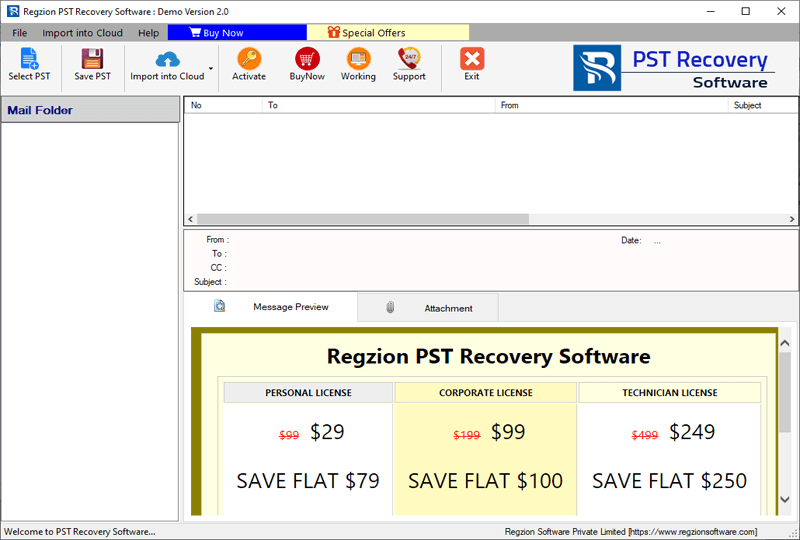
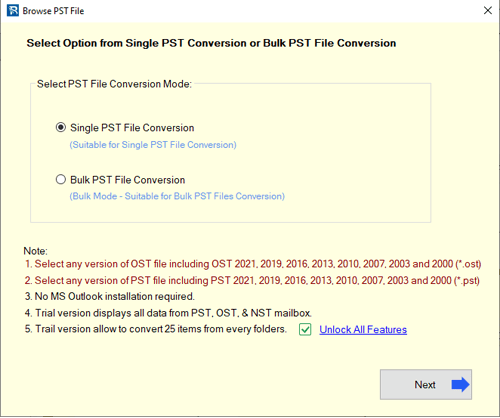
- Run the software, press Select PST button and choose either single or bulk file conversion mode.
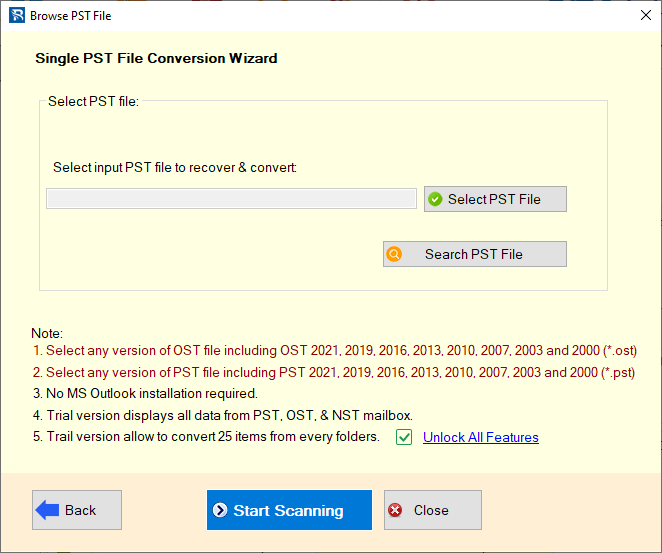
- Add your Outlook PST file (single/multiple) and click on the Start Scanning button.
- Scan PST file and load Outlook mailbox folders and items, and choose needed once.
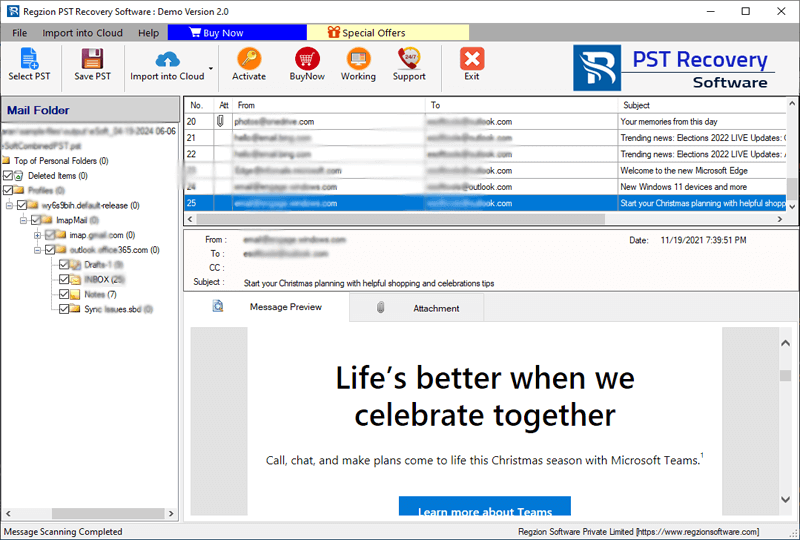
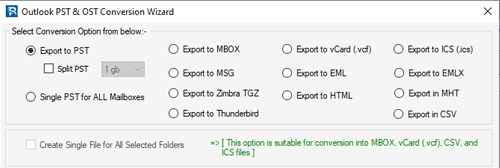
- Click on Save PST and select conversion option “Export to MSG”.
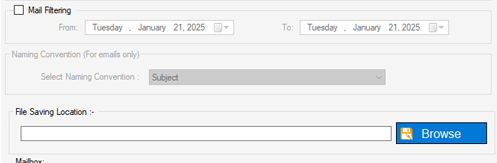
- Customize the conversion by applying settings such as: Mail Filter, Naming Convention and Saving Location Selection.
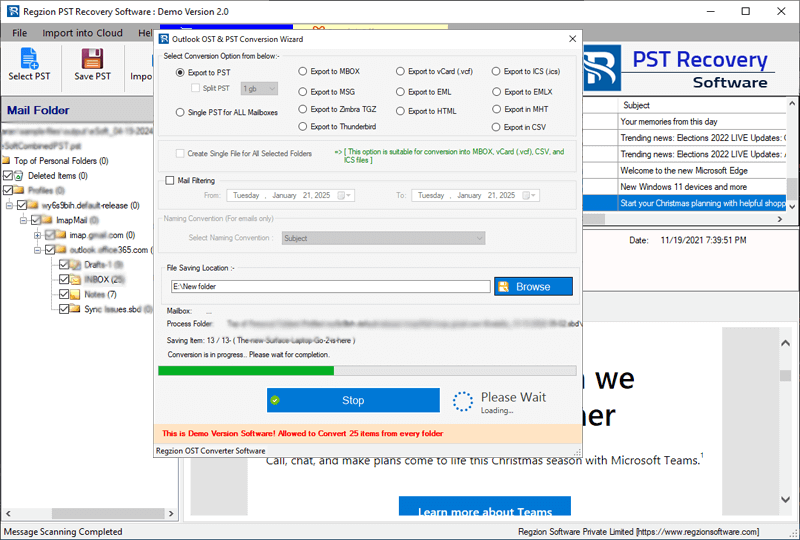
- Finally, click on Convert and start export and saving Outlook items from PST to MSG files.
Conclusion
Converting PST to MSG files is a useful way to archive or share individual Outlook items. Whether you choose the manual method or the Regzion PST conversion tool, the process is relatively simple. If you have Outlook and working PST files, the manual method will suffice, but for multiple files and in the absence of Outlook, you should use Regzion’s automated software. This will save you a lot of time and effort.


No Comments yet!