Regzion
vCard Converter Software

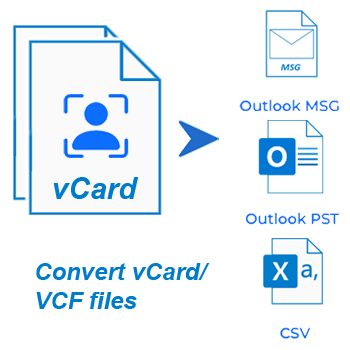
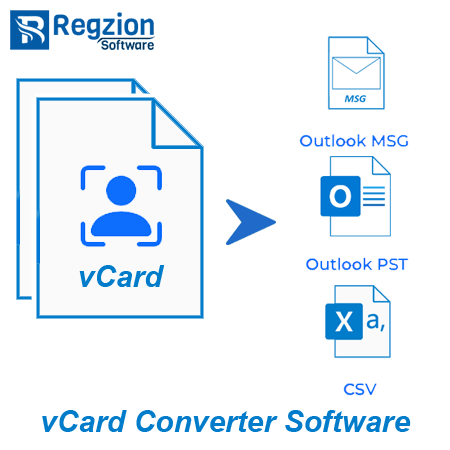
Need to convert vCard (VCF) files without losing any details? vCard Converter makes it easy. Convert vCard contact files to PST, CSV, or MSG format in just a few clicks. 100% accuracy and full control over contact data handling.

  • Converts vCard files to PST, CSV, and MSG formats with simple process.
  • Complete preservation of contact details — names, emails, numbers, & more.
  • Save vCard contact to CSV - each in separate CSV or combine all in a one file.
  • Fully supports all vCard versions and works on all Windows systems.
  • Additional facility to split multi-contact VCF files into individual contacts or merge multiple files into one.

Free Demo: Convert 5 vCard files at a time from your selected files using the demo edition.
vCard Converter

windows 10

Key Features - vCard Converter Tool


vCard converter Software
  • Convert vCard (VCF) files to PST Outlook format while preserving complete contact details.
  • Export contact data from vCard files to a structured, spreadsheet-friendly CSV format.
  • Convert VCF files to MSG format with contact data for easy access with Microsoft Outlook.
  • Batch convert multiple VCF files at one time for simultaneous mass contact management.
  • Split VCF files containing multiple contacts into separate, individual vCard files.
  • Merge contacts from multiple VCF files into a single, combined vCard file.
  • Save each contact as a separate CSV file, organized in a folder-wise structure.
  • Export all contact data into a unified CSV file for centralized viewing and editing.
  • Preserve all original contact information, including names, emails, phone numbers, and addresses, without modifications.
  • Supports vCard file versions 2.1, 3.0, and 4.0 for full format compatibility.
  • Add individual VCF files or entire folder containing multiple vCard files for conversion process.
  • Select and define a custom destination path to save all converted files.
  • Intuitive user interface for easy access for both technical and non-technical users.
  • Compatible with Windows 11, 10, 8, 7, XP, Vista, and older versions for wide platform support.

Free Demo Version Available: - Converts 5 VCF files at once and help explore all the features.

Key Capabilities of Regzion vCard Converter


Flawlessly Convert vCard Files into 3 Distinct Formats

Regzion vCard Converter software efficiently converts vCard files to PST, CSV and MSG formats. Use to migrate contacts in Outlook, organize them in a spreadsheet or transfer them to different platforms. Ensures smooth conversion without any data loss issues.

Best conversion with full preservation of contact details such as names, emails, phone numbers, and other elements. Software guarantees accurate results even when converting large batches or individual vCard files.

convert vcard contact files

Other Software Works


merge vcard files

Merge Multiple vCard Files into a Single File

Swiftly merge multiple vCard files containing different contacts into one unified vCard file. This feature helps consolidate different vCard files into a single, organized format. Making it easier to access and transfer contacts.

split vcard files

Break/Split vCard Files and Separate Contacts

Split a vCard file containing multiple contacts into separate files. Separate contacts while maintaining the integrity of each contact's details. Makes it easier to manage and share specific contacts without having to deal with bulk files.

Comprehensive Features of Regzion vCard Converter Software


export contact from vcard

Convert VCF to PST/ CSV/ MSG

Regzion lets you convert vCard (VCF) files to PST for Outlook, CSV for Excel, and MSG for individual messages (storing contacts). Each format conversion is precise and structured, ensuring your contact data fits into your preferred platform.


vCard Batch File Conversion

Whether you're migrating a few contacts or thousands, the software supports batch conversion to save time and reduce manual effort. You can load multiple files or entire folders and process them in one operation.

split vcard files

Split vCard Files into Individual Contacts

If your vCard file contains multiple contacts, you can split them into separate VCF files - one for each contact. Makes contact management more flexible and helps to selectively filter, share or import contacts.

merge vcard files

Merge Multiple vCard Files

Easily combine multiple vCard files into one master VCF file. This feature is ideal for consolidating address books, archiving contact sets, or preparing a clean file for transferring or backing up important contacts.

vcard to csv conversion

Export to CSV in 2 Modes

Choose to export each contact as a separate CSV file in a folder-wise structure, keeping contacts organized by source. Alternatively, merge all contact data into a single CSV file for easy viewing and bulk management.

export outlook ost contacts

Preserve All Contact Elements

Every element of your contact - full name, phone numbers, email addresses, company information, job title, address, website, notes and social links - is preserved without any loss or alteration during conversion.

vcard support

Supports All vCard Versions

Fully compatible with vCard versions 2.1, 3.0 and 4.0, supports both old and new file types. This ensures that users can work with a wide range of contacts exported from different apps. Cross-platform contact migration becomes easy and efficient.


Add vCard File or Folder-Wise

Users can add individual VCF files or import entire folders containing multiple files at once. This provides great convenience for individual users to perform conversions according to their needs.

Saving Location Selection

Save Output to Custom Path

Users can choose any destination path to save converted files depending on personal or organizational needs. This gives full control over file organization and storage location. Gives you the freedom to determine where the converted files should be saved.

smart graphical interface

Clean & Friendly Interface

The UI is designed with clarity in mind - no clutter, no confusion. Just choose your files, select a format, and start converting vCard files to the desired format available. Even non-technical users can get professional results in minutes.

workable on all windows edition

Windows O/S Compatibility

Fully compatible with Windows 11, 10, 8.1, 7, XP, Vista or older versions, the software installs fast and runs smoothly on desktops and laptops without the need for advanced configuration or admin-level setup.

free vCard conversion

Available Free Demo Version

You can convert up to 5 vCard files from selected folders at once using the free demo version. This is the perfect way to explore the features, test the performance, and evaluate the tool before purchasing the full version.

Software Comparison - Free vs Paid+ Version

Trial Version ( Free) Pro Edition ($49)
Convert vCard to PST, CSV, and MSG Formats
Batch Conversion - Convert Multiple VCF Files at Once ×
Limited to 5 files in demo
Split Multi-Contact VCF into Separate vCard Files
Merge Multiple vCard Files into One
Export Contacts to Folder-Wise or Single CSV File
Preserve All Contact Fields Without Any Data Loss
Support for vCard Versions 2.1, 3.0, and 4.0
Save Output to User-Defined Destination Path
Convert Unlimited vCard Files Without Restriction ×
Limited to 5 files in demo
Free Download Purchase Now

What customers says about

Regzion vCard File Conversion Software


⭐ 4.9/5 based on 473 reviews


Excellent 96%
Good 3%
Average 1%
Below Average 0%
Poor 0%

"I have used several vCard converters, but none offer the combination of speed and accuracy like this Regzion software. Converting multiple vCard files to one PST file was very easy. Definitely a great investment for managing contacts."

Emma Richardson

Australia

⭐⭐⭐⭐⭐

"I needed to split a large VCF file into individual contacts, and Regzion did it perfectly. The process was simple, and every contact detail was preserved without any problems. Really a great utility."

Sophia Johnson

Canada

⭐⭐⭐⭐⭐

"Regzion vCard Converter made it easy to transfer contacts between different systems. It converted all my vCard files to CSV format for better organization and analysis. Highly satisfied with the product."

Jack Wilson

United Kingdom

⭐⭐⭐⭐⭐

Convert vCard files in 3 Easy Steps


Install the vCard Converter on your Windows PC and launch the application.

Import one vCard file or entire folders with multiple vCard files. Manage bulk files for conversion

Select the vCard files, choose your desired output format (PST, CSV, MSG, etc.), and start the conversion.

Software Specification


software details
Software Info
Regzion vCard Converter Software
Version:    2.5
Available License:    Personal, Corporate, & Technician
Version Support
File type:     vCard / VCF
Version:     2.1 / 3.0 / 4.0
System Requirements
Processor:   Intel® Pentium Class (x86, x64) or equivalent
Hard Disk Space:   50 MB of free hard disk space
RAM:   Minimum 512 MB is required
Windows O/S:   Win 11/ 10/ 8.1/ 8/ 7/ XP/ Vista and older editions.
Software Delivery
( License Key )
Electronic:   YES
Mode:   Delivery by E-mail
Weekends Delivery:   YES

Frequently Asked Questions


  • Get Regzion vCard Converter, install it on Windows PC and launch the application.
  • Click on Convert vCard radio button and press the Next button.
  • Choose vCard File mode or vCard Folder mode and add your vCard file or entire folders.
  • Hit on Go Next and choose specific contacts/folders and select an output format - PST, CSV, MSG.
  • Choose a custom folder to save the converted files on your computer.
  • Click Convert to begin converting vCard files to your desired format.
vCard Converter

Regzion vCard Converter supports converting vCard/VCF files to 3 different file formats, including PST, CSV, MSG. You can easily convert your contacts to the format you need to use in applications such as Outlook, Excel and more.

Yes, the software allows batch conversion. You can import multiple vCard files or entire folders and convert them to your preferred format all at once, saving time and effort.

Yes, Regzion vCard Converter ensures that all contact details including names, emails, phone numbers, and addresses remain intact. The software preserves every part of the contact data without any modification or loss during conversion.

Yes, this software supports vCard files of all versions - including 2.1, 3.0, and 4.0. This wide compatibility ensures that all vCard files, regardless of the version, can be converted efficiently.

Yes, the tool is compatible with all the major Windows operating systems including Windows 7, 8, 10, 11 or others. It works seamlessly in all these versions for smooth performance.

After importing vCard files, you can manually select individual contacts or specific files for conversion from the list of included folders and items.

The free version allows converting up to 5 vCard files at a time. The full version removes all these restrictions, allowing you to convert an unlimited number of vCard files without any limits.

Trusted By Leading Brands

Brand 1
Brand 2
Brand 3
Brand 4
Brand 5
Brand 6