Export all Outlook for Mac Mailbox Items
Emails
Contact
Calendar
Tasks
Notes
Extract mailbox data from Outlook for MAC OLM files from your Windows O/S-based computer. Convert OLM files to various file types through this one software. Perform OLM file conversion in a few easy clicks with guaranteed preservation of important data.
* Free download OLM Converter demo to convert OLM files with 25 items from each folder.


"Tested several times and got the perfect result of OLM file conversion every time."
- By TechRadar

"OLM Converter has assisted to convert 55GB size OLM file without facing any errors."
- By CNET

"Great software to export Outlook for Mac profile to Office365 mailbox via Windows."
- By PCMag
Convert OLM files with Free OLM Converter demo & export up to 25 items from each folder.
Regzion OLM Conversion Tool
Result-oriented approach for Outlook for Mac file conversion through your Windows desktop. Best exporter for OLM file items like- emails, contacts, calendars, tasks, journals, and more. Get various smart functions and export options to perform the best OLM file conversion.


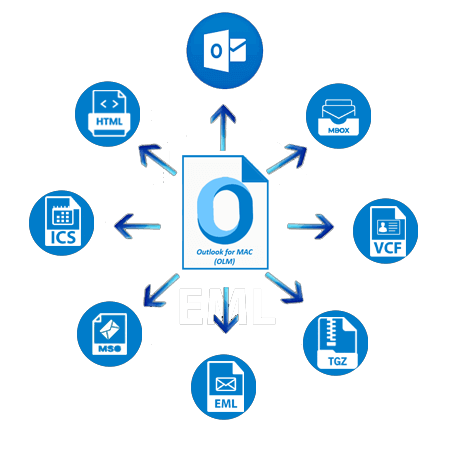
Specialized tool created for Converting OLM Files of Outlook for MAC application. From your windows computer convert OLM files to over 10+ file types. OLM Conversion into PST, EML, EMLX, MSG, HTML, MHTML, MBOX, Zimbra, ICS, and vCard.
Securest OLM file migration to Office365 platform. Assist in directly exporting Outlook for Mac data to Office365 account. Migrate OLM to Office365 primary mailbox, In-place archive folder, or custom new folder.

Get the facility to export/convert OLM as well as open OLM and read its internal data. Use this software to directly open OLM file in your Windows machine. No email client or Mac machine is required to open OLM.

Best way to convert Outlook for MAC files one by one or multiple files at the same time. Convert one or multiple OLM files to the desired file type with options: -
Available 3 distinct option to convert OLM to Outlook PST format: -
Convert OLM files to conversion formats - EML, MSG, EMLX, HTML, and MHTML. Saving the internal items of the OLM file to these file types allows users to save each item as a separate file. Keep each item safe in a separate file with complete related information. Also, get the naming convention feature with these conversion options.

Assists in Converting OLM with Outlook for Mac Contact and calendar items. Also, offers separate conversion options: -

Smartest way to convert OLM files of Outlook for MAC application. On a Windows computer easily run the software and convert OLM file of all sizes. Convertible OLM files generated from Mac machine and any version of Outlook for MAC - 2021, 2019, 2016, 2010, or earlier.

Trial of OLM converter software is free with demo version. Take the help of OLM file converter demo version for safe execution of conversion. Convert OLM to PST or any other available conversion format with up to 25 items per folder.
Provides feature to load Outlook for Mac profile mailbox folders from OLM files. Get a preview of all folders available inside your OLM file. Easily select only required folders to export items from them to PST or other conversion formats.
Performs best and fastest OLM email export job with the help of email filtering function. Facilitates to choose date of email and exporting them specifically. Easily make selection of date range by selecting of a start date and end date.
Provides naming convention feature to specify the name format of the resultant file. Available with conversion formats - EML, EMLX, HTML, MHTML, or MSG. Choose a naming format from any of the 9 different options available based on email attributes- From, Subject and Date.
GUI based software to perform OLM file conversion smoothly and effortlessly. With a few simple clicks, you can perform the conversion and get your perfect result for each conversion task. Easily accessible for both professionals and novices.
Developed to work on computers with Windows operating system. Without any problem, you can run this software on a computer with any old or new version of Windows - 11, 10, 8.1, 8, 7, Vista, XP or earlier.
Smartest solution to execute different operations with your Outlook for MAC files. Get the facility to directly opening OLM files, Converting OLM files, and Migrating OLM files.
Export all Outlook for Mac Mailbox Items
Emails
Contact
Calendar
Tasks
Notes
Instant OLM File Conversion to 12+ file formats


Migrating OLM to Cloud Email Platforms

| Trial Version ( Free) | Paid Version ($39) | |
|---|---|---|
| Convert Outlook for MAC OLM files | ✓ | ✓ |
| Converr Single OLM file | ✓ | ✓ |
| Converr Multiple OLM file (Bulk Conversion) | ✓ | ✓ |
| Export Selective folders from OLM | ✓ | ✓ |
| Migrate OLM to Office365 | ✓ | ✓ |
| Open & Preview OLM Mailbox items | ✓ | ✓ |
| Exporting OLM Emails of chosen dates | ✓ | ✓ |
| Unlimited OLM File Conversion | × | ✓ |
| Free Download | Purchase Now |


| Version: | 2.5 |
| Available License: | Personal, Corporate, & Technician |
| Email client: | Outlook for MAC |
| Version: | 2021, 2019, 2016, 2010, and earlier |
| File type: | OLM |
| Processor: | Intel® Pentium Class (x86, x64) or equivalent |
| Hard Disk Space: | 50 MB of free hard disk space |
| RAM: | Minimum 512 MB is required |
| Windows O/S: | Win 11/ 10/ 8.1/ 8/ 7/ XP/ Vista and older editions. |
| Electronic: | YES |
| Mode: | Delivery by E-mail |
| Weekends Delivery: | YES |

Yes, the software offers separate conversion option Export to Existing PST file (Outlook Profile). This enables users to import OLM files data to exiting PST file that configured with any Outlook profile.
Yes, with conversion options - EML, MSG, EMLX, HTML, and MHTML, you can preserve each OLM item in a separate file.
Yes, for exporting and saving OLM contact separately the software offers conversion format vCard. Users can easily save all OLM contacts to vCard files (single or separate).
Yes, there is feature for importing all OLM Calendar to single ICS files. While selecting ICS Conversion format you just need to mark Create Single File for all folders.
Currently this software is offering users to migrate OLM to Office365 accounts.
Yes, there is a preview function available in this software. It allows users to get a preview of all Outlook for Mac mailbox data that available inside the OLM file.
It never makes any changes to the inner items of OLM files and preserves them in new files in their original format.
It also allows you to manually select any location from your local drive to store the files obtained as a result of conversion.
No, this software will complete the conversion without the need for Outlook or any other application. Also, there is no need for a MACOS-based machine.






OLM Converter Software first screen
Add and Open OLM files

OLM Conversion