Regzion
ICS Converter Software

An intuitive solution for converting ICS calendar files into various formats with accuracy and ease. Whether you want to share a calendar in a different format, migrate calendars to other platforms, or export data for backup, this tool simplifies the entire process.

  • Supports ICS Conversion to 9+ formats - PST, PDF, MSG, HTML, CSV, ∓ more.
  • Provides 2 flexible ICS adding modes: Folder mode and File mode.
  • Preview calendar data before conversion without need for additional tools.
  • Allows manual selection of folders, items, and destination location.
  • Ensures 100% data integrity with support for ICS files from any platform.

Free Demo: Export up to 15 ICS items per folder to desired conversion format at no cost.
ICS Converter

windows 10

Key Features - ICS Converter Tool


ICS converter Software
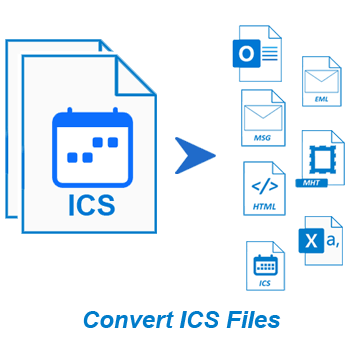
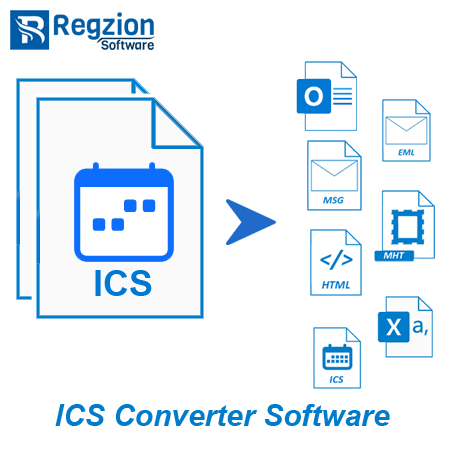
  • Fastest ICS File Conversion with calendar events to 9+ formats - PST, MSG, EML, NSF, HTML, MHTML, CSV, ICS, and PDF.
  • Support two modes for importing ICS files: Folder mode and File mode for flexible import.
  • Preview calendar events from ICS before conversion without need for additional software.
  • Manual selection of folders and items for accurate conversion into the desired format.
  • No data loss during conversion, all original calendar details remain intact.
  • Convert multiple ICS files simultaneously for faster and more efficient processing.
  • No problem with ICS files generated from any software or platform, all are supported.
  • Additional function to migrate ICS calendars to Office 365 with a direct process.
  • Conversion and transfer process is simplified as no additional equipment is required.
  • Select specific destination folder to save the converted files, which provides flexibility.
  • User-friendly interface designed for easy navigation and smooth execution of tasks.
  • It is Windows-compatible and can be used on any Windows machine (up to Windows 11).

Free Trial Edition: - Allows users to convert up to 15 ICS items per folder with zero charges.

Regzion ICS Converter - Main Functions


Instant & Flawless ICS File Conversion to Multiple formats

Regzion ICS Converter, the software that will allow you to convert ICS calendar files into multiple formats. Convert ICS to PST, MSG, EML, PDF, HTML, CSV, and other file types. This flexibility of conversion helps users to access ICS calendar with various email clients and platforms.

Whether you are creating a calendar backup, sharing events or migrating data. ICS maintains all event details, metadata and formatting in the file. Additionally, gives you the function of batch conversion and an intuitive interface makes the process fast, accurate and easy for all users.

convert ics calendars

Other Software Works


upload pst to cloud mail

Migrate Calendar from ICS to Office 365

Software with the function to transfer your calendar events from ICS files directly to Office 365 accounts. Migrates calendars while maintaining data integrity and accuracy. This function is ideal for professionals who want to transfer calendars and use them on cloud-based systems (Office365/Microsoft365).

open ICS calendar files

Open ICS (View Calendar Items)

Quickly open and view the contents of your ICS files within the software. Preview all calendar data including event details, times and descriptions before initiating the conversion or migration. Opens ICS files directly and requires no additional tools.

Key Features of Regzion ICS Converter Software


export calendar from ics

High-Speed ICS Conversion

Ultimate program to convert ICS calendar files to over 9 widely used formats such as PST, MSG, EML, NSF, HTML, MHTML, CSV, ICS and PDF. Enjoy fast, reliable conversion regardless of the file size or the number of calendar items in ICS files.


Dual ICS File Import Modes

Offers 2 file modes for processing with specific ICS files or folder mode for handling multiple files simultaneously. Perfect for small-scale conversions and alternatively bulk migrations. Users can choose a mode that best suits their need or data structure.

open ICS calendar files

Built-In ICS Calendar Preview

Easily preview the contents of ICS file before the conversion begins. View calendar with all elements such as- meeting details, invitees, event details, etc. No third-party software or calendar apps are required to review the data.

add ics

Selective Folder/Item Export

Allows users to manually select specific folders containing ICS files or ICS files containing specific calendar entries for conversion. You get full control over the conversion, avoiding unnecessary data processing. Ideal for users who want to extract and convert only selective calendar data.

retain original calendar data

Data Integrity with Zero Loss

Retains all original calendar elements from the calendar entries of the ICS file during conversion, including subject, date, time, attachments, recurrence, etc. No compromise on the reliability or quality of your exported data. This ensures nothing is lost when moving calendars between formats.

ics support

ICS File Batch Conversion

Convert multiple ICS files at once to save time. Perfect for all types of individuals - IT administrators, business users, as well as individuals. Helps easily handle large amounts of calendar data at once. Accelerates processing speed with the selection of multiple ICS files.


Universal ICS Compatibility

Supports ICS files created by any calendar application, including Google Calendar, Outlook, Apple Calendar and others. Eliminates the worry of file rejection or compatibility issues during import. Simply insert a file created from any software and convert quickly.

import ICS to Office365

Migrate ICS to Office 365

Migrate ICS calendar events directly to your Office 365 account. This software includes a simplified process that does not require additional connectors or tools. Helps to safely transfer calendar data from ICS files to Microsoft 365 with a simple process.

Saving Location Selection

Customizable Saving Path

Choose the exact location as the output destination folder to store your converted files. This feature allows for better file organization and quick access after conversion. Any location can be selected, whether saving locally or to a shared drive.

smart graphical interface

Friendly & Intuitive Interface

Software is designed with simplicity in mind. Its interface clean and guides users step-by-step through the conversion process. No technical expertise is required, making it suitable for both beginners and professionals.

workable on all windows edition

Support for All Windows O/S

Fully compatible with Windows 11 and older versions including Windows 10, 8.1, 8, 7, Vista, XP, etc. The software runs smoothly on both 32-bit and 64-bit systems. Install and operate with confidence on any Windows-based machine.

free ICS conversion

Available Free Trial Edition

A free trial version is available with the capability to convert up to 15 calendar items per folder at zero cost. It is perfect for evaluating the functionality and performance of the software before purchasing.

Software Comparison - Free vs Paid+ Version

Trial Version ( Free) Pro Edition ($49)
Preview ICS Calendar Events Before Conversion
Convert ICS to PST, MSG, EML, NSF, HTML, PDF, CSV & More
Batch Conversion – Convert Multiple ICS Files at Once
Supports ICS from Any Source (Google, Outlook, Apple, etc.)
Manual Selection of Folders & Calendar Items
Save Output to Custom Folder Location
Direct Migration to Office 365 ×
Upgrade required for O365 migration
Unlimited Conversion of Calendar Events ×
Limited to 15 items per folder in trial version
Free Download Purchase Now

What customers says about

Regzion ICS File Conversion Software


⭐ 4.9/5 based on 473 reviews


Excellent 96%
Good 3%
Average 1%
Below Average 0%
Poor 0%

"We used this ICS converter tool to process a large number of ICS files from different departments. It offers different saving format options and we converted it to PST and CSV formats. It did the job without any problem."

David Reynolds

United States

⭐⭐⭐⭐⭐

"I had to migrate ICS files to Office 365 without complicated steps. This software did exactly that with a straightforward and simple migration process. This tool is easy to navigate, even non-technical users can operate it without any problems."

Lucy Mitchell

Australia

⭐⭐⭐⭐⭐

"This converter helps me manage my calendar events easily. It allows converting ICS file of Outlook, Google Calendar, Apple Calendar and more without creating any kind of problem. Also, the ability to select specific items and choose the output format is a huge advantage."

Jean-Pierre Dubois

Canada

⭐⭐⭐⭐⭐

Convert ICS files in 3 Easy Steps


Install ICS Converter on any Windows PC and open the application to begin.

Import one or more ICS files or folders. Preview events before conversion.

Select items, Choose a format (PST, PDF, CSV, etc.) and start the ICS File conversion.

Software Specification


software details
Software Info
Regzion ICS Converter Software
Version:    2.5
Available License:    Personal, Corporate, & Technician
Version Support
File type:     ICS (ICalendar)
System Requirements
Processor:   Intel® Pentium Class (x86, x64) or equivalent
Hard Disk Space:   50 MB of free hard disk space
RAM:   Minimum 512 MB is required
Windows O/S:   Win 11/ 10/ 8.1/ 8/ 7/ XP/ Vista and older editions.
Software Delivery
( License Key )
Electronic:   YES
Mode:   Delivery by E-mail
Weekends Delivery:   YES

Frequently Asked Questions


  • Download, install and launch Regzion ICS Converter on a computer with windows O/S.
  • Click on Select ICS File/Folder button from menubar then select Folder Mode or Files Mode to ICS files.
  • Hit on Next to let the tool quickly read and organize calendar entries from the selected files.
  • View calendar items in detail, including event subjects, dates, times, recurrence rules, etc.
  • Manually choose the events or folders you want to convert, or select all for full export.
  • Pick your desired output format such as PDF, PST, CSV, MSG, or other supported types.
  • Choose where to save your converted files by setting a custom output directory.
  • Press Convert to begin the process for converting ICS files.
ICS Converter

Yes, this tool supports batch processing. You can import folders containing multiple ICS files and convert all ICS files at once. This ensures efficient conversion without data loss and saves your valuable time.

Of course, it retains all event metadata such as subject, time, recurrence, location, and description. Your calendar data remains intact and fully readable in all supported output formats.

Yes, the software displays complete preview of the events available in the ICS files in its in-built preview panel. This helps to verify the content and lets you selectively choose which entries to convert or skip.

It supports PST, MSG, EML, PDF, HTML, MHTML, NSF, CSV and ICS formats to save calendar of your ICS file. You can easily choose the format that best suits your needs.

Yes, you have full control to select individual items or folders for accurate conversion. This avoids unnecessary data processing, you can select only the required calendar items.

Yes, ICS files of all major platforms are supported without any compatibility issues. This tool is designed to handle standard ICS of any source application.

Yes, users can set a custom folder location to store the output files that users gets as result of conversion.

The trial version converts up to 15 ICS calendar items per folder, which is ideal for testing the tool's features. To unlock unlimited conversions, users can upgrade to the full licensed version.

Trusted By Leading Brands

Brand 1
Brand 2
Brand 3
Brand 4
Brand 5
Brand 6